
You studied for hours, walked into the exam, and forgot everything the moment the questions appeared. The notes were there. The understanding was not.
Poor note-taking is one of the most overlooked reasons students underperform. Writing everything down without a system means capturing words rather than understanding.
That is exactly what the Cornell Notes system was built to solve. Developed at Cornell University, this research-backed method turns passive writing into active learning.
We have covered the system’s origin, page structure, a Cornell notes example, the 5R method, and key benefits.
What are Cornell Notes?
Cornell Notes is a structured note-taking system developed by Walter Pauk at Cornell University in the 1950s, first introduced in his book How to Study in College.
Built on the principle that active recall beats passive re-reading, it has since been adopted across K-12 schools, universities, and corporate training programs worldwide.
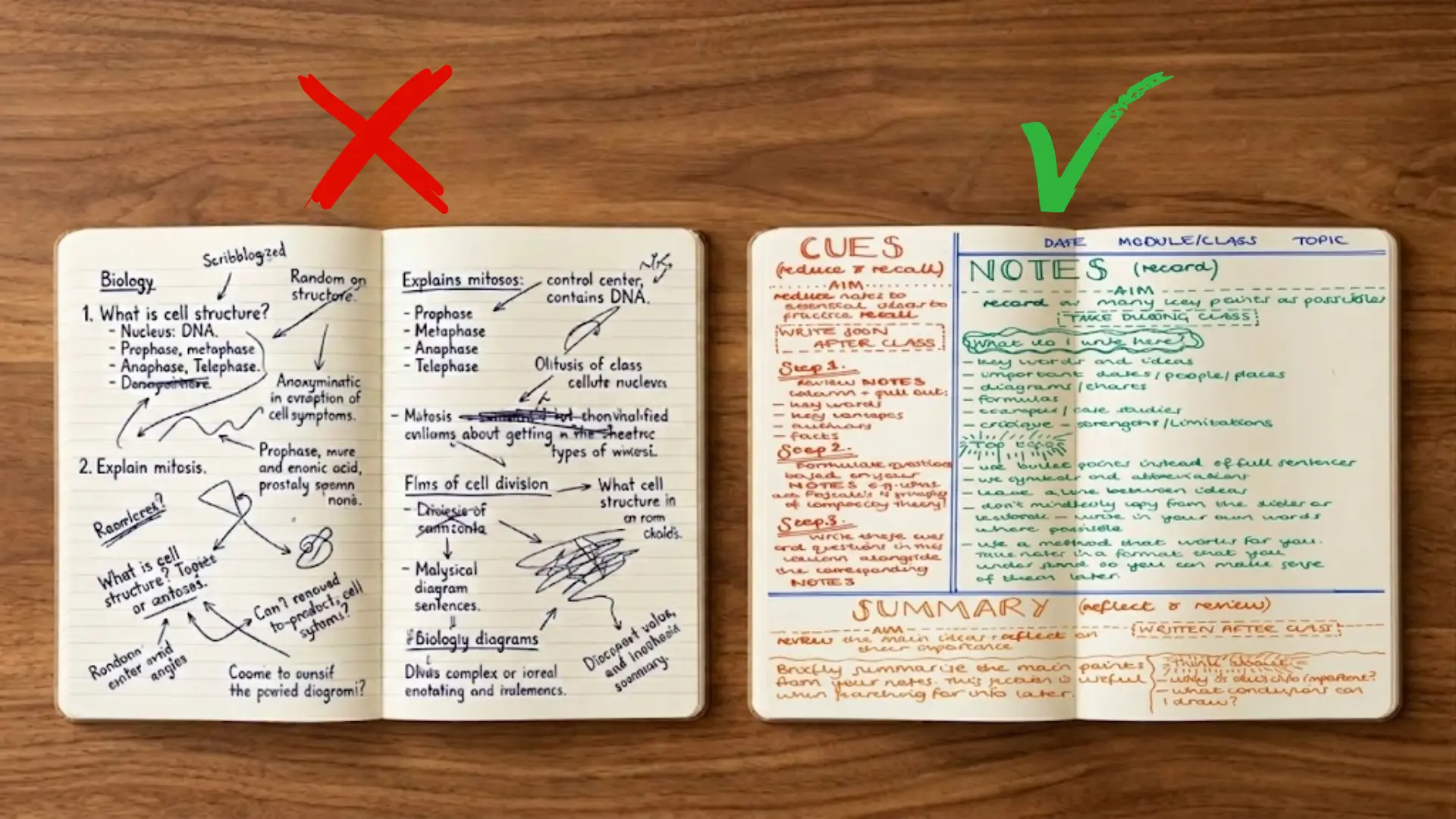
The system divides a page into three sections, each serving a specific cognitive purpose.
Rather than writing everything down and hoping it sticks, students engage with material twice: once during the lecture and again during review.
Not just a page layout. A proven method backed by decades of learning science.
The Anatomy of a Cornell Notes Page
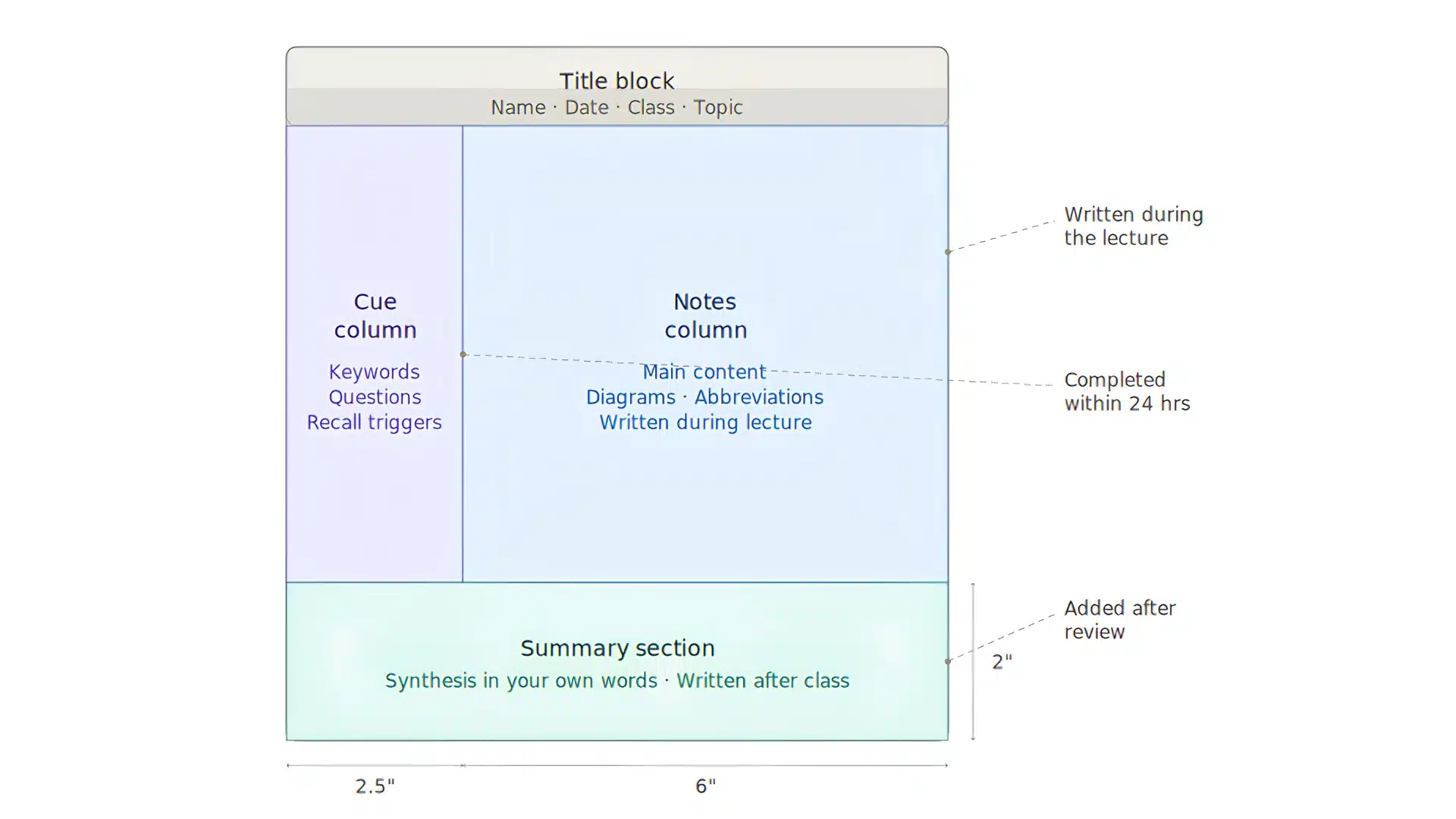
Understanding what goes where, and why, is what separates the system from ordinary note-taking.
Every Cornell note follows the same page structure. Three sections, each with a distinct role in the learning process.
1. The Cue Column
The narrow left column, 2.5 inches wide, is where active recall begins.
After class, write keywords, questions, and memory triggers here that correspond to your notes. Never fill this column during the lecture.
It is a post-class tool designed to help you test your own memory during review. Every entry should be specific enough to trigger a full idea.
2. The Notes Column
The largest section, at 6 inches wide, is where you write during the lecture or while reading. Skip word-for-word transcription. Use abbreviations, short phrases, and rough diagrams instead.
Speed and clarity matter more than completeness here. Capturing core ideas accurately is far more important than writing down everything the teacher says.
3. The Summary Section
The 2-inch section at the bottom is where the real learning happens. Written in your own words after reviewing the page, it forces you to synthesize rather than repeat.
Two to three sentences are enough. If you cannot summarize the page clearly, that is a sign you need to review your notes again before moving on.
What is the Purpose of Cornell Notes?
Cornell Notes exists to solve a problem that most note-takers never realize they have. Writing information down feels productive. Retaining it is a different matter entirely.
The purpose of the system is not documentation. It is comprehension.
- To capture information efficiently during a lecture or reading session without the pressure of perfect organization in the moment.
- To force active processing after the fact by requiring the student to re-engage with the material through the cue column.
- To build a self-testing tool into the page itself through retrieval practice.
- To create organized, exam-ready reference material that holds its value weeks after the lecture.
Cornell Notes from every simpler method. It does not ask the student for more during class. It asks more after, which is precisely when most learning actually happens.
Example of Cornell Notes: Step-by-Step Walkthrough
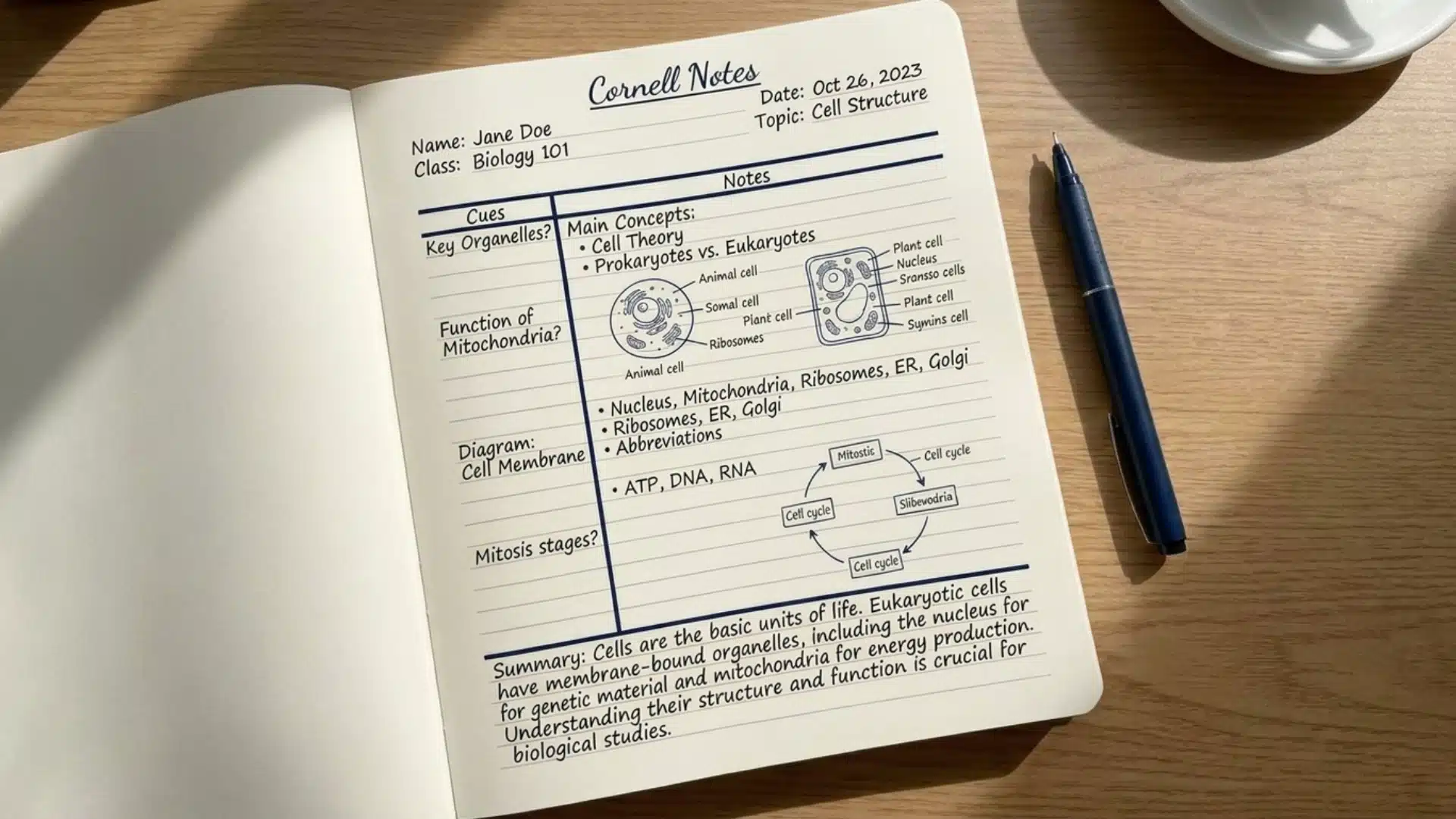
The best way to understand the system is to see it in action.
The example below of how to take Cornell notes is based on a high school biology lecture on cell structure, a topic dense enough to show how the format handles real academic content.
Step 1: During the Lecture
As the teacher speaks, write only in the right-hand notes column. The goal is not to capture every word. It is to capture every idea.
Here is what raw notes might look like mid-lecture:
” Cells: basic unit of life. Two types: prokaryotic (no nucleus, bacteria) and eukaryotic (has nucleus, plants/animals). Organelles: mitochondria makes ATP, nucleus holds DNA, ribosomes make proteins. Cell membrane controls entry and exit.”
Step 2: After the Lecture
Within 24 hours, return to the page and fill in the left-hand cue column. For every idea in the notes column, write a question or keyword directly opposite it.
Cover the right side and answer each question from memory. That is the system working exactly as intended.
Step 3: Writing the Summary
At the bottom of the page, write two to three sentences in your own words. Do not copy from the notes column. Synthesize.
“Cells are the basic unit of all living organisms. Eukaryotic cells contain membrane-bound organelles including the nucleus, mitochondria, and ribosomes, each serving a distinct function. Understanding their structure is foundational to all biological study.”
Students who skip this step are skipping the entire point of the system. The summary is where passive notes become active memory
Further, you can click here to see how Cornell University breaks down the system in its own words.
The 5R Method: The System Behind the System
Cornell Notes is not just a page layout. It is built on a five-step methodology, which Walter Pauk called the 5R Method. Each step corresponds directly to a physical action on the page and to a cognitive process grounded in learning science.
| Step | Action | Where on the Page |
|---|---|---|
| Record | Write main ideas, facts, and diagrams as the lecture unfolds | Notes column |
| Reduce | Condense those notes into keywords and questions within 24 hours | Cue column |
| Recite | Cover the notes column and answer each cue question from memory | Cue column |
| Reflect | Connect the material to what you already know and question its deeper meaning | Summary section |
| Review | Revisit the full page weekly to strengthen long-term retention | Entire page |
Together, the five steps turn a single page of notes into a complete study cycle. No separate flashcards, no re-reading entire chapters. The page itself becomes the tool.
Benefits of Cornell Notes

Cornell Notes has remained in active use across classrooms and professional settings for over seven decades. That kind of staying power is not built on habit alone. It is built on results.
1. Long-Term Retention
A study published in the Journal of Research in Education found that students who used structured note-taking formats, including Cornell Notes, outperformed peers who used unstructured methods on delayed recall tests.
The system works because it embeds retrieval practice and spaced repetition directly into the note-taking process, two of the most evidence-supported techniques in cognitive psychology.
2. Active Engagement
Unlike linear note-taking, where the pen moves but the brain stays passive, Cornell Notes demands decisions at every stage.
What is worth writing? What question does this answer? How does it all connect? That ongoing engagement deepens encoding from the first moment of contact with the material.
3. Organized Reference Material
Every completed Cornell Notes page is exam-ready by design. The cue column serves as a self-test tool. The summary section provides a quick review in under thirty seconds.
No additional organization is needed after the fact.
4. Beyond the Classroom
The system translates directly to professional environments. Meeting notes, conference takeaways, and research reading all benefit from the same structure.
The format also works well for anyone consuming online courses, podcasts, or long-form video content.
Where Cornell Notes Fall Short
Cornell notes work well for many students, but the system is not without its drawbacks. Here is an honest look at where it can fall short:
- Takes longer to set up each page: Formatting the layout before every class eats into prep time, especially for students with back-to-back classes.
- Not ideal for math or diagram-heavy subjects: The column structure does not adapt well to equations, graphs, or visual content.
- Requires practice to use effectively: The system feels awkward and inefficient until it becomes a habit, which takes time for most first-time users.
- May feel restrictive for some learning styles: The fixed layout does not suit students who prefer free-form or visual note-taking.
- Hard to use during fast-paced lectures: Keeping up with the format while listening quickly becomes overwhelming.
None of these drawbacks makes the system unusable. Knowing them upfront just helps you decide whether Cornell notes are the right fit for your situation.
Cornell Notes in the Digital Age
The Cornell Notes format has moved well beyond paper. Students and professionals today use the same structure across digital tools, with Notion, OneNote, and GoodNotes as the most widely used platforms for creating Cornell Notes templates.
| Feature | Digital | Handwritten |
|---|---|---|
| Speed | Faster | Slower |
| Retention | Lower | Higher |
| Organization | Easier to edit | Fixed once written |
| Diagrams | Limited | More flexible |
| Searchability | Yes | No |
Digital Cornell Notes only work if the discipline of the system is maintained, regardless of the input device. Abbreviate. Paraphrase. Synthesize. The template is the frame. The thinking is still the work.
Tips and Strategies for Better Cornell Notes
Mastering the Cornell method takes more than knowing the format. Students need specific strategies to make their notes more effective. These tips help improve both note-taking speed and study results.
- Write questions, not just keywords: The cue column works better with actual questions that test understanding.
- Keep summaries brief: Limit the bottom section to 2-3 sentences that capture only the main ideas.
- Color-code important points: Use highlighters sparingly to mark critical concepts that appear on exams.
- Practice regularly: The system gets easier and faster with consistent use over several weeks.
These strategies work best when applied consistently from the very first session. The more deliberate you are with each step, the faster the system becomes second nature.
How Cornell Notes Compares to Other Note-Taking Methods
Not all note-taking methods deliver the same results. Here is how Cornell Notes stacks up against the two most commonly used alternatives.
| Feature | Cornell Notes | Linear Notes | Outline Notes |
|---|---|---|---|
| Encourages active recall | Yes | No | Partial |
| Built-in review tool | Yes | No | No |
| Forces synthesis | Yes | No | Partial |
| Works for visual learners | Yes | Partial | Partial |
| Exam-ready format | Yes | No | Partial |
Linear and outline notes capture information. Cornell Notes processes it. That distinction is what separates a page you write once from a page you actually learn from.
Frequently Asked Questions
Who Invented Cornell Notes?
Cornell Notes was developed by Walter Pauk, an education professor at Cornell University, in the 1950s. He introduced the system in his book How to Study in College.
What Are the Three Sections of a Cornell Notes Page?
The three sections are the cue column on the left for keywords and questions, the notes column on the right for main content written during the lecture, and the summary section at the bottom for synthesis written after class.
Is Cornell Note-Taking Effective?
Yes.Research consistently supports the system’s effectiveness. It embeds retrieval practice and spaced repetition directly into the note-taking process, two of the most evidence-backed techniques in cognitive psychology.
Final Thoughts
Three hours of studying should never end in a blank mind. That is the problem Cornell Notes was built to fix.
We covered the system’s origin, page anatomy, a real worked Cornell notes example, the 5R method, proven benefits, and how to use it digitally and professionally.
The difference between students who retain information and those who rarely come down to intelligence is that. It comes down to the system.
Bookmark this page and come back every time you sit down to take notes. Everything you need to study smarter is right here.